Designing a great digital product starts with a strong foundation — and that foundation is the wireframe. Whether you’re building a website, app, or software interface, creating wireframes helps visualize structure, flow, and functionality before moving into full-scale design. But with so many tools to design wireframes available, finding the best tool to design wireframe can be overwhelming.

In this comprehensive guide, we’ll explore what wireframes are, why they matter, and highlight the best wireframing tools available today — from beginner-friendly options to advanced platforms used by professional UI/UX designers.
What Is a Wireframe?
A wireframe is a low-fidelity visual representation of a webpage or application interface. It outlines the placement of elements, navigation, and interactions — without the distraction of colors, images, or detailed design components.
Think of it as the blueprint of your digital product. It focuses on structure and user flow rather than aesthetics.

Key Purposes of a Wireframe
- Clarify structure: Shows how content and elements are organized.
- Improve communication: Helps teams (designers, developers, clients) align on layout and functionality early on.
- Save time and cost: Prevents design rework later by catching usability issues early.
- Test user experience: Enables early usability testing before high-fidelity designs or code.
Creating wireframes is an essential step in any design process — but the key is using the right tools to design wireframes efficiently and collaboratively.
You may be interested AI workflow builder: Choose the Best
Why Use a Tool to Design Wireframes?
While it’s possible to sketch wireframes on paper, digital wireframing tools offer advantages like:
- Drag-and-drop components
- Collaboration features
- Integration with design and prototyping platforms
- Easy iteration and version control

The best tool to design wireframe will let you move quickly from concept to prototype — while supporting real-time teamwork and feedback.
Key Features to Look for in the Best Tool to Design Wireframe
When evaluating tools to design wireframes, consider these core features:
- Ease of Use – A user-friendly interface is crucial for fast design iterations.
- Pre-built UI Components – Access to templates and widgets speeds up your process.
- Collaboration Tools – Real-time editing, commenting, and sharing features enable team synergy.
- Prototyping Capabilities – The ability to link screens and simulate interactions.
- Integration Options – Works seamlessly with tools like Figma, Slack, or Jira.
- Cloud Storage – Ensures accessibility and version control.
- Cross-Platform Compatibility – Runs smoothly on Mac, Windows, and web browsers.
Now, let’s dive into the top tools to design wireframes available today.
You may be interested AI powered workflow: Automation, Innovation, and Clinical Applications

Top 10 Best Tools to Design Wireframes
Figma
Figma has quickly become the go-to best tool to design wireframe for modern teams. It’s a browser-based collaborative design platform known for its real-time co-editing features.
Key Features:
- Cloud-based with live collaboration
- Extensive UI kits and component libraries
- Easy wireframe-to-prototype transition
- Plugins for automation and design systems
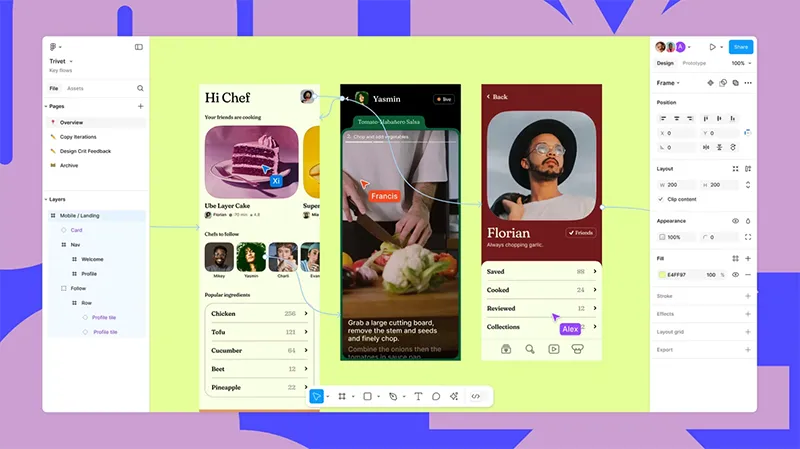
Why It’s Great: Designers love Figma for its versatility — you can sketch wireframes, design interfaces, prototype, and even hand off code all in one platform.
Best for: Teams, startups, and agencies that prioritize collaboration.
Adobe XD
Adobe XD is a professional-grade design and prototyping tool that excels in both wireframing and UI design. With its clean interface and integration into the Adobe ecosystem, it’s a favorite among designers already using tools like Photoshop or Illustrator.
Key Features:
- Vector-based design
- Interactive prototyping
- Voice command integration
- Real-time collaboration via Coediting

Why It’s Great: Adobe XD is both powerful and intuitive, making it one of the best tools to design wireframes for cross-functional design teams.
Best for: Professional designers and enterprise-level design systems.
You may be interested White Label SaaS: The Complete Guide to White Label SaaS Products
Sketch
Sketch was one of the pioneers in digital UI/UX design. It’s especially popular among Mac users for its simplicity and plugin ecosystem.
Key Features:
- Intuitive layout and vector editing
- Shared libraries and reusable components
- Integration with InVision, Zeplin, and Abstract
- Wireframing templates and plugins
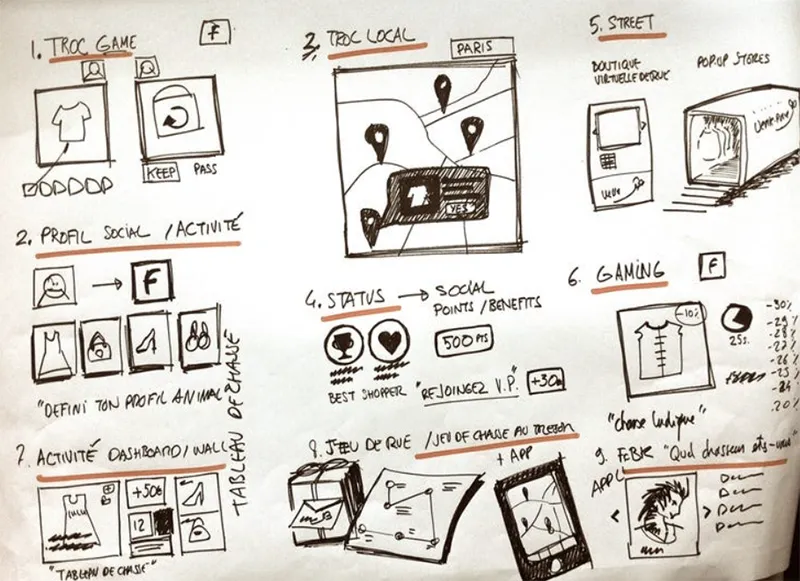
Why It’s Great: Sketch remains one of the most efficient wireframing tools for those who value performance and customization.
Best for: Mac-based designers and product teams.
Balsamiq Wireframes
When it comes to rapid low-fidelity design, Balsamiq is often the first name that comes up. Its hand-drawn aesthetic and drag-and-drop interface make it perfect for quick conceptualization.
Key Features:
- Sketch-style visuals for low-fidelity wireframes
- Extensive built-in UI elements
- Cloud or desktop version available
- Ideal for non-designers or beginners

Why It’s Great: Balsamiq is one of the easiest tools to design wireframes, especially for product managers, developers, or clients who need to express ideas fast.
Best for: Beginners and early-stage brainstorming.
Axure RP
Axure RP is a professional-grade wireframe and prototyping tool used by enterprise UX teams. It allows designers to create complex interactions, conditional logic, and dynamic content — ideal for high-fidelity wireframes.
Key Features:
- Advanced interactions and logic
- Documentation and specifications included
- Collaboration features via Axure Cloud
- Integration with Jira and Slack

Why It’s Great: Axure bridges the gap between wireframing and prototyping — perfect for designers who need functional accuracy.
Best for: Enterprise UX designers and analysts.
Miro
Originally a digital whiteboard platform, Miro has evolved into a powerful wireframing tool for collaborative teams. It’s perfect for brainstorming, user flow mapping, and early-stage wireframes.
Key Features:
- Infinite canvas and drag-and-drop shapes
- Wireframe templates
- Real-time team collaboration
- Integration with Slack, Figma, and Jira
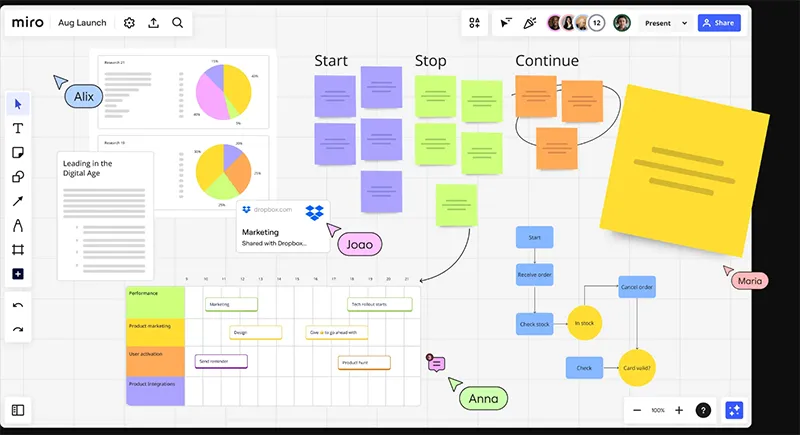
Why It’s Great: Miro combines the freedom of brainstorming with the structure of wireframing — a perfect choice for cross-functional teams.
Best for: Remote teams and agile workflows.
Lucidchart
Lucidchart is primarily a diagramming tool, but it’s also great for creating structured wireframes and user flows. It’s highly visual and simple to use.
Key Features:
- Flowcharts and wireframes in one platform
- Extensive shape libraries
- Real-time collaboration
- Integrates with Google Workspace and Atlassian
Why It’s Great: Lucidchart is perfect for teams that want to blend flowcharts, sitemaps, and wireframes seamlessly.
Best for: Product managers and technical teams.
You may be interested Customer support tools for your business
Justinmind
Justinmind is a full-featured wireframe and prototyping tool that focuses on interaction and simulation. It’s great for designers who want realistic prototypes.
Key Features:
- Drag-and-drop wireframing
- Advanced interactions and animations
- Usability testing features
- Integration with Sketch and Photoshop
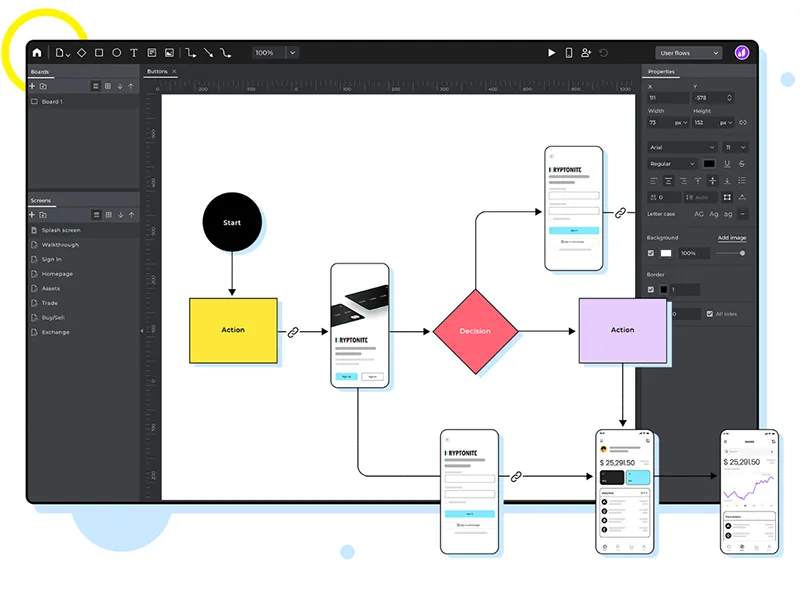
Why It’s Great: Justinmind bridges the gap between design and user testing, offering everything from low-fidelity wireframes to clickable prototypes.
Best for: UX designers focused on usability testing.
Moqups
Moqups is a web-based wireframing and prototyping tool designed for simplicity. It offers a clean interface with pre-built templates, icons, and stencils.
Key Features:
- Cloud-based design
- Built-in templates for web and mobile
- Real-time team collaboration
- Integrations with Google Drive and Dropbox
Why It’s Great: Moqups is lightweight and easy to use — perfect for quick wireframes and collaborative projects.
Best for: Small teams and freelancers.
Whimsical
Whimsical offers a minimal and intuitive interface for creating wireframes, flowcharts, and mind maps all in one place. It’s fast, collaborative, and visual.
Key Features:
- Pre-built UI elements
- Real-time collaboration
- Supports flowcharts and diagrams
- Great for quick ideation

Why It’s Great: Whimsical is ideal for visual thinkers who need to organize ideas, flows, and wireframes in one workspace.
Best for: Teams looking for fast, visual collaboration.
You may be interested The Best ChatGPT Alternatives in 2025
How to Choose the Best Tool to Design Wireframe
Choosing the right wireframe design tool depends on your needs, skill level, and workflow. Here’s a quick guide:
- For beginners: Start with Balsamiq or Moqups — fast and intuitive.
- For collaboration: Choose Figma, Miro, or Whimsical for real-time teamwork.
- For professional UI/UX design: Go with Adobe XD, Sketch, or Axure RP.
- For enterprises: Axure RP or Adobe XD offer depth and scalability.
Before committing, take advantage of free trials to find your personal best tool to design wireframe.

Best Practices for Designing Effective Wireframes
Using the best tool to design wireframe is just the start. To make your wireframes effective:
- Keep it simple: Focus on layout and functionality, not aesthetics.
- Use placeholders: Gray boxes, simple icons, and basic typography work best.
- Prioritize user flow: Guide users logically through screens.
- Gather feedback early: Share drafts with team members and stakeholders.
- Iterate often: Wireframes are living documents — refine continuously.
You may be interested Why is chat gpt not working? Common Issues and Fixes
FAQs About Tools to Design Wireframes
- Which wireframing tool is best for team collaboration?
Figma and Miro are excellent for team-based workflows with real-time collaboration.
- Can I create wireframes without design skills?
Yes! Tools like Balsamiq and Lucidchart make it easy for non-designers to create functional wireframes.

- Are there free tools to design wireframes?
Yes. Figma, Whimsical, and Moqups offer free plans with essential wireframing features.
- What’s the difference between wireframing and prototyping?
Wireframing focuses on structure and layout; prototyping adds interaction and functionality for testing user experience.
Wireframing is the cornerstone of successful digital design. Whether you’re building a mobile app, SaaS platform, or corporate website, choosing the best tool to design wireframe can make the entire process faster, clearer, and more collaborative.
A user-friendly AI platform that’s easy to deploy, helping SMEs automate processes, boost efficiency, and connect with customers naturally.
LIKEFLOW – Smarter AI, Faster Growth
- Phone : +1(719) 313 7576
- Email : support@likeflow.ai
- Address : 1942 Broadway St. STE 314C Boulder CO 80302




Leave a Reply